7
min read

Tong
TL;DR
Deleting a WeChat account is permanent and cannot be reversed after the cancellation period.
Before deletion, back up important chats, contacts, files, and payment records.
You must clear WeChat Pay balances and resolve linked services before cancellation.
Account deletion can only be completed through the WeChat mobile app.
If you no longer use WeChat or want to remove your personal data, deleting your account may be the right option. However, deleting a WeChat account is different from simply uninstalling the app. Removing the app only deletes it from your device, while account deletion permanently removes your access and associated data.
Before you delete your WeChat account, it is important to understand what information will be lost, how the process works, and what steps you need to complete beforehand. This guide explains how to delete a WeChat account, how to terminate a WeChat account safely, and what alternatives are available if you only want to limit your usage.
Key Points to Consider Before Deleting Your WeChat Account
Deleting a WeChat account is a permanent action. Once the cancellation process is completed, your account, profile information, and connected data cannot be restored.
Before proceeding, consider the following:
Your WeChat contacts, chat history, Moments posts, Favorites, and saved content will be removed. Any information stored only within WeChat should be backed up before cancellation.
Your WeChat Pay account also requires attention. Any remaining balance must be withdrawn, and outstanding payments must be settled before deletion. Connected services, subscriptions, memberships, and Mini Programs linked to your account may also be affected.
For business users, additional preparation is required. If you manage Official Accounts, Mini Programs, or WeCom accounts, you must transfer administrator permissions or terminate those roles before deleting your account.
Deleting your account does not remove previous obligations, transactions, or responsibilities connected to your activity on WeChat.
What Happens to Your Data After Account Deletion?
After you request deletion, WeChat processes your account cancellation during a waiting period. According to WeChat’s account deletion process, data removal is completed after the cancellation period, which differs depending on the device system.
Android users generally have a shorter cancellation period, while iOS users may have a longer waiting period. During this period, users may still cancel the deletion request by logging back into their account.
Some limited information, such as registration records, may be retained for security, compliance, and anti-spam purposes.
Can You Recover Your WeChat Account After Deletion?
During the cancellation period, you may stop the deletion process by logging back into your account.
After the waiting period ends, deletion becomes permanent. Your previous account data, including messages and contacts, cannot be recovered.
You may be able to register a new WeChat account using the same phone number, but the new account will not restore your previous information.
What Happens to Linked Services and Subscriptions?
Deleting your WeChat account affects all connected services.
Before cancellation:
Clear your WeChat Pay balance
Cancel subscriptions and memberships
Use remaining vouchers or rewards
Transfer business administration rights
Once deleted, these services cannot be recovered through the old account.
How to Back Up Your WeChat Data Before Deleting Your Account
Before you delete your account, save anything important that you may need later.
WeChat provides built-in tools to back up chat history and transfer conversations. You should also export important contacts, save key Moments posts, and download transaction records from WeChat Pay if required.
Remember that after account deletion, you will no longer be able to access this information.
Step-by-Step Process: How to Delete Your WeChat Account
To delete your WeChat account, you must complete the process through the mobile application. Account cancellation is not available through the desktop or web version.
Before starting, make sure:
Your WeChat Pay account is closed or settled
No payments are pending
Third-party services are disconnected
Business roles are transferred if applicable
Follow these steps:
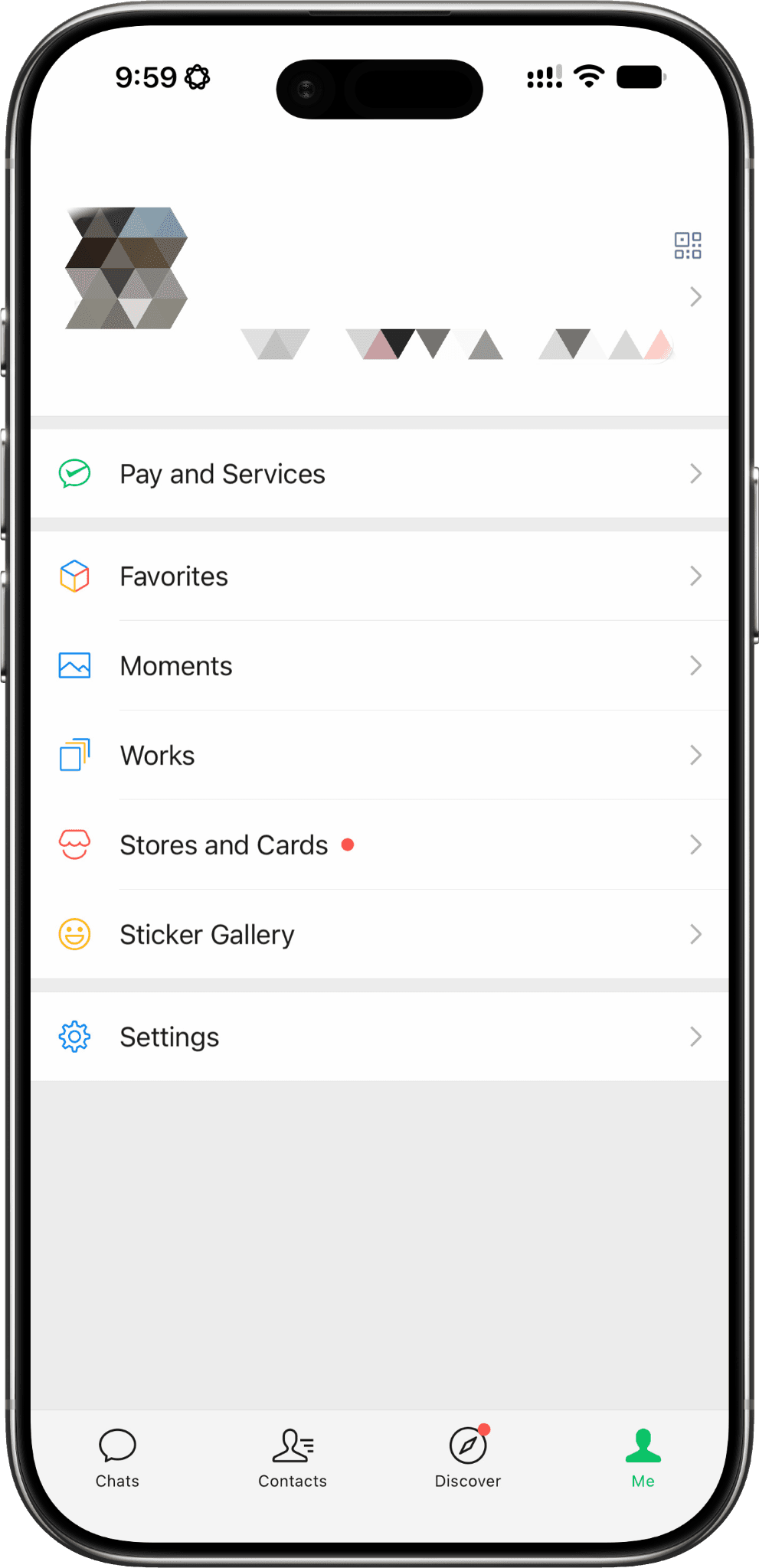
Open WeChat and tap Me
Launch the WeChat app on your mobile device and tap the Me tab in the bottom-right corner. This is where you'll find your personal profile, settings, payment services, and account management options.
Go to Settings
From the Me page, tap Settings to access your account preferences, privacy controls, security options, and other account management features.
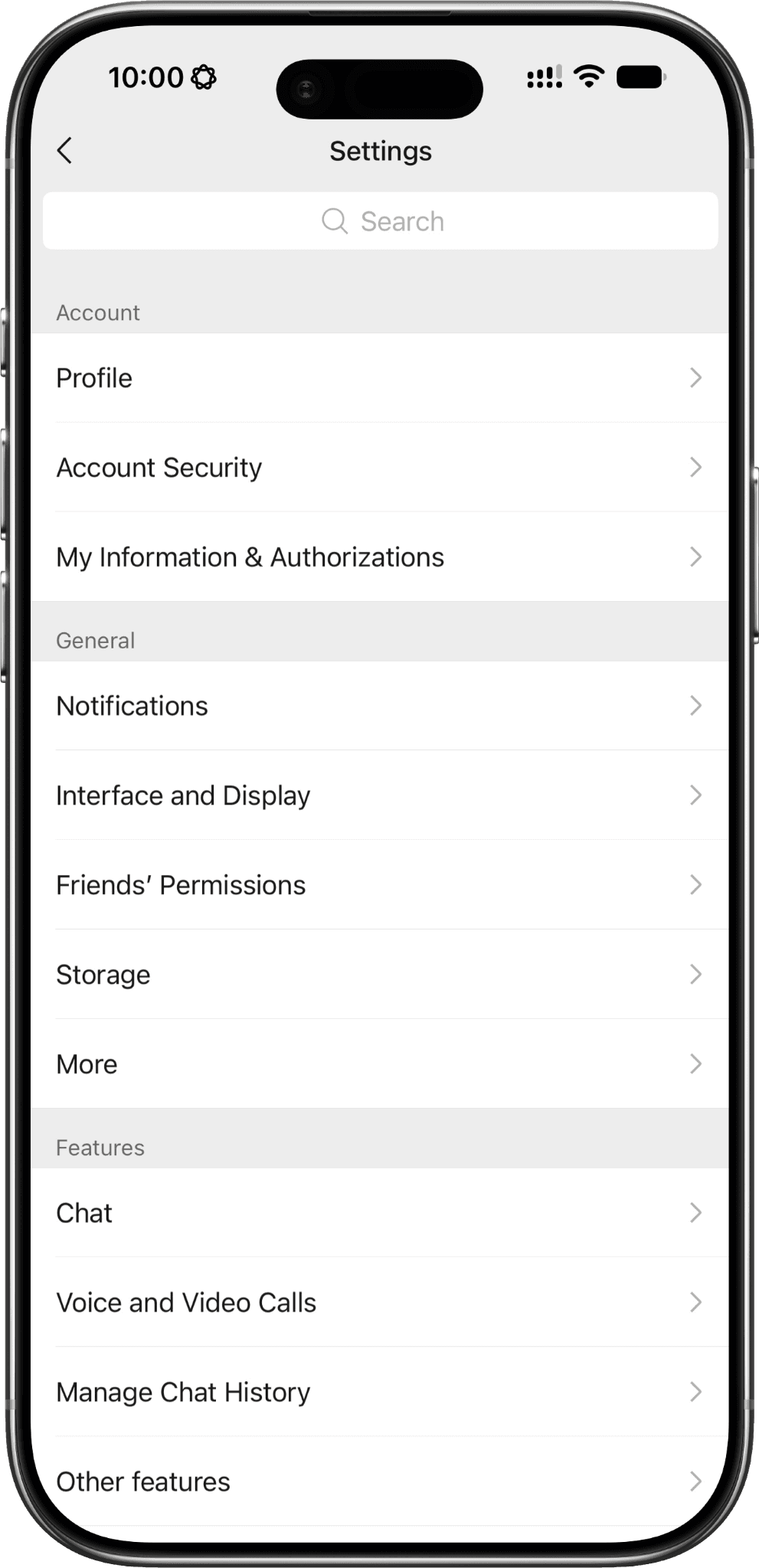
Select Account Security
Within the Settings menu, tap Account Security. This section allows you to manage your login methods, linked phone number, password, and other security-related settings.
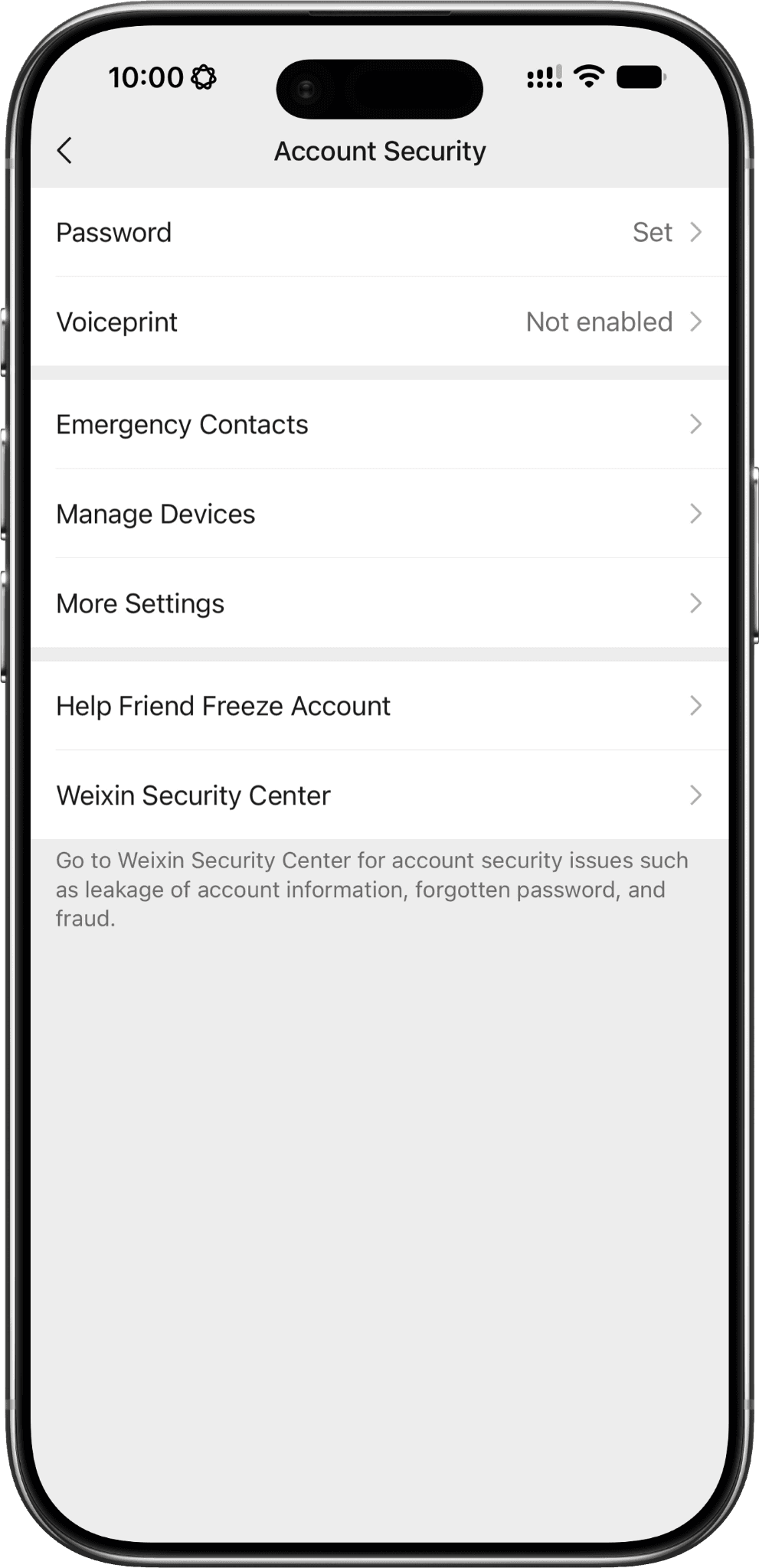
Open WeChat Security Center
Scroll down and select WeChat Security Center. This is the dedicated hub for account protection, recovery, freezing your account, and permanent account cancellation.
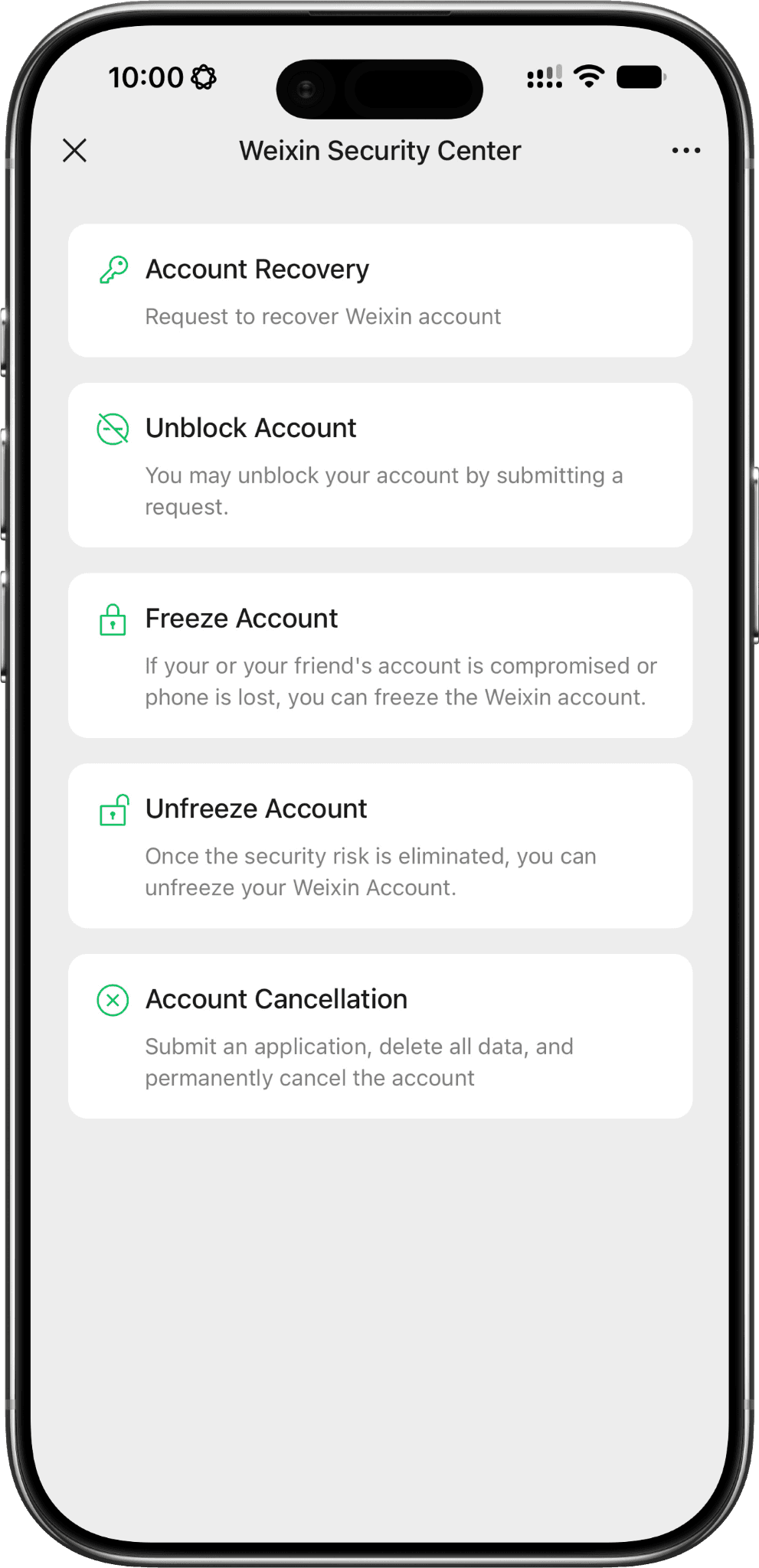
Select Account Cancellation
Tap Account Cancellation to begin the deletion process. WeChat will first check whether your account meets the eligibility requirements, such as having no outstanding WeChat Pay balance or unresolved account issues.
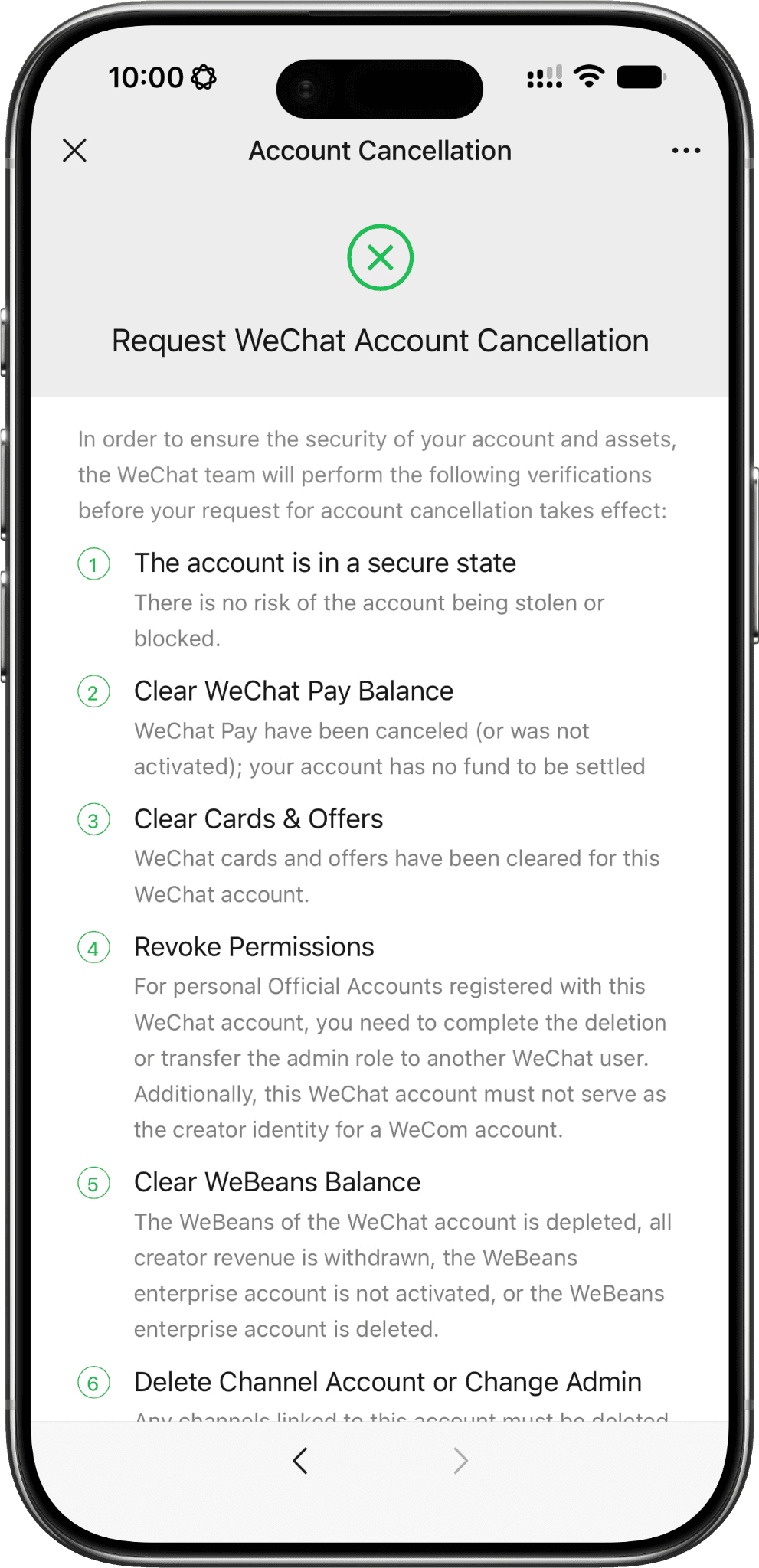
Follow the instructions and complete the verification process
Carefully follow the on-screen instructions to verify your identity and confirm your request. Once submitted, WeChat will start the account cancellation process. During the cancellation period, avoid logging back into your account, as doing so may automatically cancel your deletion request.
WeChat will review your account eligibility before allowing cancellation. If your account meets all requirements, the deletion request will be submitted.
After confirmation, avoid logging back into your account during the cancellation period. Logging in may cancel the deletion request.
Special Instructions for Business, Admin, or Mini Program Users
Business users need to complete additional steps before deleting an account.
If you manage:
Official Accounts
Mini Programs
WeCom accounts
You must transfer administrator access or remove your permissions first.
You should also handle:
Remaining balances
Coupons and vouchers
Cards and Offers
Active business services
How to Delete WeChat Pay Before Account Cancellation
WeChat Pay must usually be closed before deleting your main WeChat account.
To close WeChat Pay:
Go to:
WeChat → Me → Services → Wallet → Payment Settings
Select Close WeChat Pay Account and follow the instructions.
Before closing:
Withdraw remaining funds
Clear outstanding payments
Resolve any pending transactions
Alternatives to Deleting Your WeChat Account
Deleting your account is not the only option. If you simply want a break from WeChat or want to improve privacy, consider alternatives.
You can:
Freeze your account temporarily
Disable unnecessary notifications
Remove third-party permissions
Uninstall the app while keeping your account
These options allow you to return later without losing your data.
How to Freeze Your WeChat Account
Freezing your account temporarily blocks access and helps protect your account if you lose your phone or suspect unauthorized activity.
The usual path is:
Me → Settings → Account Security → WeChat Security Center → Safety Tools → Freeze Account
You can unfreeze your account later by completing verification.
Uninstalling the App vs Deleting the Account
Uninstalling WeChat only removes the application from your device. Your account, contacts, and data remain available if you reinstall and log back in.
Deleting your account permanently removes access and associated data.
Troubleshooting Common Issues With WeChat Account Deletion
Some users cannot complete deletion because certain requirements have not been fulfilled.
Common issues include:
WeChat Pay is still active
Make sure all balances and payments are cleared.
Administrator permissions remain active
Transfer ownership of Official Accounts, Mini Programs, or WeCom accounts.
Deletion option is unavailable
Your account may not meet eligibility requirements. Try again later or contact WeChat support.
When contacting support, provide your WeChat ID or registered phone number to help verify your account.
Frequently Asked Questions About Deleting a WeChat Account
Can I recover my WeChat account after deletion?
Only during the cancellation period. Once deletion is completed, your account and data cannot be restored.
How long does it take to delete a WeChat account?
The process includes a waiting period before permanent deletion. The duration depends on your operating system.
Can I use the same phone number for a new WeChat account?
Yes, but your previous account data will not be recovered.
What happens to my messages and files after deleting my account?
They will be permanently removed after account deletion. Back up important information before cancelling.
Will my friends still see my account?
After deletion is completed, your account will no longer be available.
Can I delete my WeChat account from a computer?
No. Account deletion must be completed through the mobile app.
What if I have issues with WeChat Pay?
Clear all balances, payments, and linked services before attempting deletion.
Does deleting my account remove responsibility for previous activity?
No. Account deletion does not remove previous transactions, agreements, or legal responsibilities.
Summary
Title




Go further
Explore our services and platforms


Newsletter