5
min read

Tong

TL;DR
Creating a WeChat account requires a smartphone, a valid mobile number, and the WeChat mobile app.
Most users register using their phone number, although Apple Sign In is available on some devices.
Some registrations require friend verification through a QR code, especially for overseas users.
After registration, set a unique WeChat ID, update your profile, and review your privacy settings.
With more than a billion monthly active users, WeChat has evolved far beyond a messaging application. Developed by Tencent, it is often referred to as a "super app" because it combines messaging, voice and video calls, social networking, digital payments, business services, mini programs, and much more within a single platform.
Whether you're traveling to China, communicating with friends or family, working with Chinese businesses, or expanding into the Chinese market, creating a WeChat account is often the first step.
However, registering for WeChat isn't always as straightforward as signing up for other social platforms. New users—particularly those outside Mainland China—may encounter additional security checks, SMS verification, or friend-assisted verification before their account can be activated.
This guide explains exactly how to create a WeChat account, from preparing for registration to completing security verification, setting up your profile, and troubleshooting common registration issues.
What to know before registering a WeChat account
Before creating your account, it's worth understanding WeChat's registration requirements. Unlike many messaging apps, WeChat uses several verification measures to reduce spam and fraudulent accounts.
To register successfully, you'll need:
A smartphone running iOS or Android
An active mobile phone number that has never been linked to another WeChat account
A stable internet connection
The latest version of the WeChat mobile application
At the moment, account registration can only be completed through the WeChat mobile app. Although WeChat offers desktop applications for Windows and macOS, they cannot be used to create a new account.
The registration experience may also differ depending on where you live. Users registering within Mainland China often have access to additional services such as WeChat Pay immediately after verification, while overseas users may experience different onboarding flows or feature availability.
One of the biggest challenges for international users is security verification. During registration, WeChat may ask an existing user to scan a QR code to confirm your identity. This additional verification helps Tencent reduce fake accounts and automated registrations.
The person assisting with verification must also meet certain eligibility requirements. Generally, they must have an active WeChat account in good standing, satisfy minimum account age requirements, and not have exceeded the number of recent verification requests allowed by WeChat.
It's also important to remember that each mobile phone number can only be linked to one personal WeChat account. If your number has already been used previously, you'll need to recover the existing account or register using another eligible number.
Finally, before completing registration, you'll need to accept WeChat's Terms of Service and Privacy Policy. Like most digital platforms, WeChat collects account information, device details, and certain usage data to provide its services. Taking a few minutes to review these policies helps you understand how your information is managed.
Step-by-step guide: How to create a WeChat account
Although WeChat registration may seem complicated at first, the process is relatively straightforward if you follow each step carefully. One important recommendation is not to leave the registration process halfway through, as doing so may require you to repeat certain verification steps.
For most users, registering with a mobile phone number is the simplest and most reliable option. On some devices, additional sign-in methods such as Apple ID may also be available. While these alternatives can simplify login, they may still require a valid phone number during account verification.
Download and install the WeChat app
Start by downloading the official WeChat application from a trusted source. Depending on your device, you can install it from the Apple App Store or Google Play Store. The latest version is also available through WeChat's official website.
Avoid downloading APK files or installation packages from unofficial websites. Besides creating potential security risks, outdated or modified versions of the app may cause registration problems or fail security verification.
Once installed, launch the application and allow any required permissions, such as notifications or camera access, which are necessary for features like QR code scanning and account verification.
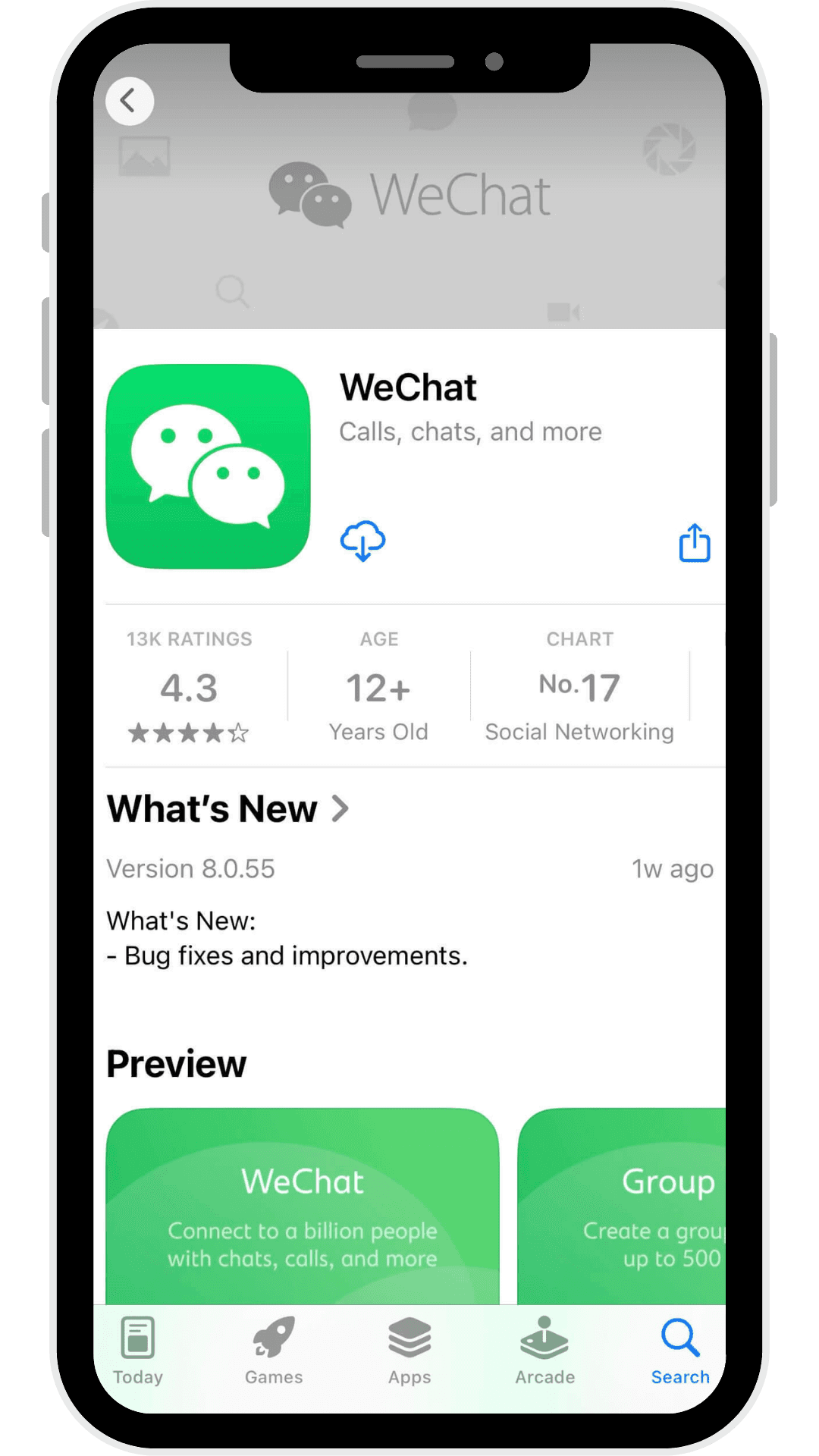
Start the sign-up process
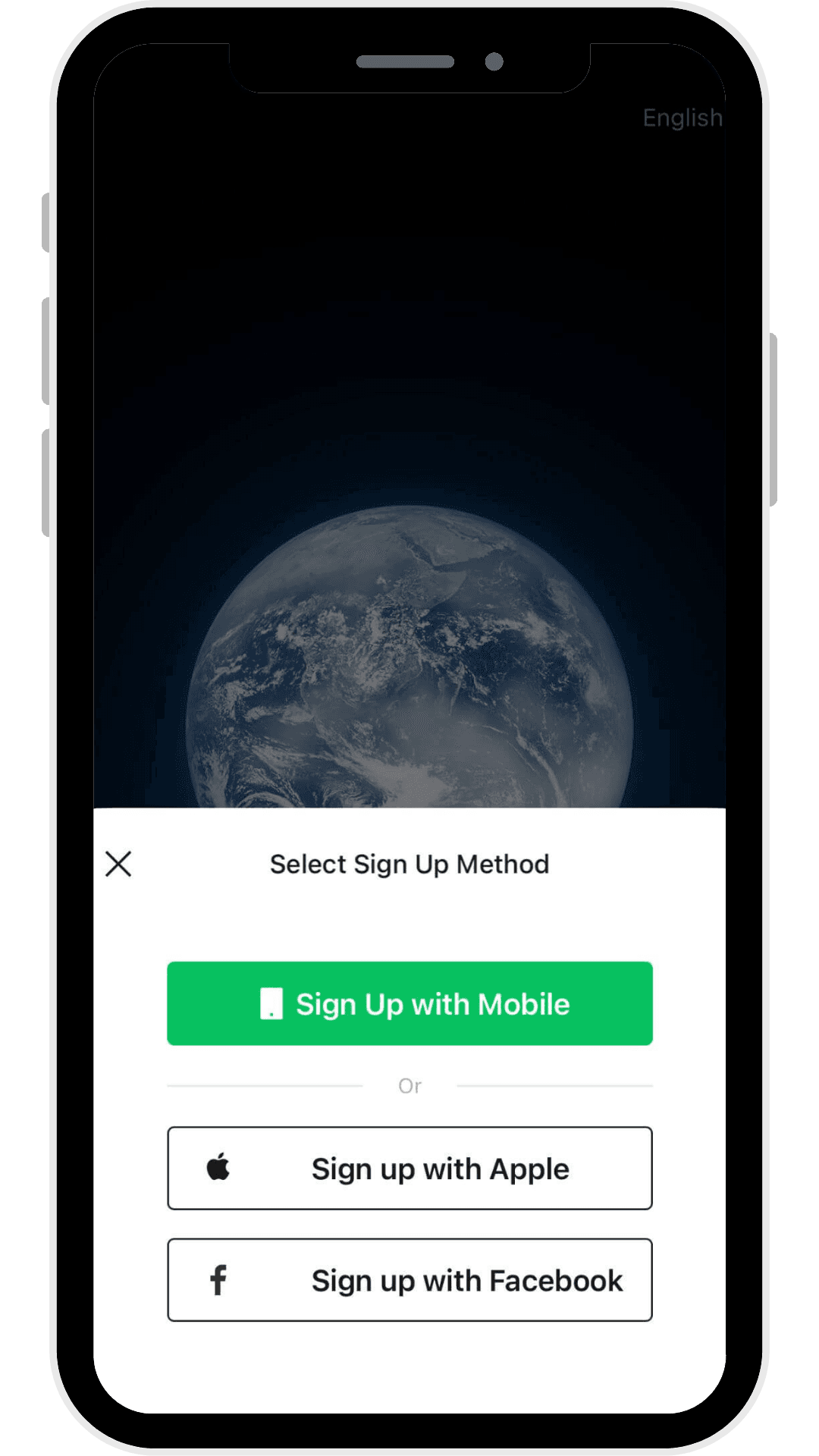
When you open WeChat for the first time, you'll be presented with two main options: Log In and Sign Up.
Select Sign Up to begin creating a new account.
Depending on your device and region, you may see several registration methods, including:
Sign up with a mobile phone number (recommended)
Sign in with Apple (supported on eligible Apple devices)
Other region-specific login options where available
For most users—especially those creating their first account—registering with a mobile phone number remains the easiest and most reliable choice.
Enter your personal details
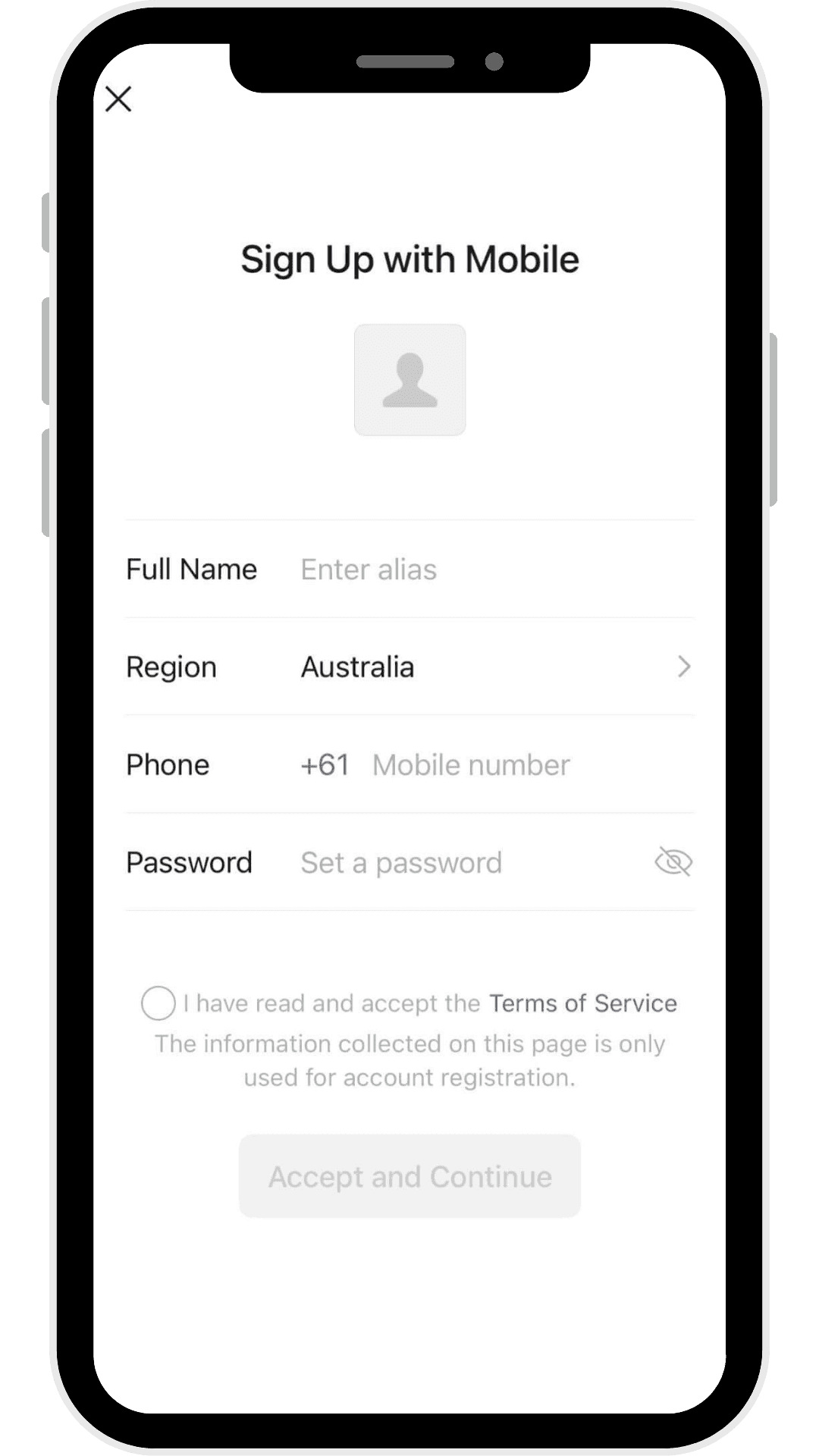
After selecting your preferred registration method, WeChat will ask you to provide some basic information to create your account.
You'll need to enter your display name, select your country or region, choose the correct country code, enter your mobile phone number, and create a strong password. Although adding a profile picture is optional at this stage, uploading one can make your account easier for friends and colleagues to recognize later.
Before continuing, double-check that your phone number is correct. This number will be used for SMS verification and future account recovery, so using an active and accessible mobile number is essential.
Finally, read and accept WeChat's Terms of Service before moving to the next step.
Consent to privacy and data collection policies
Like most digital platforms, WeChat requires users to accept its Privacy Policy before creating an account. The policy explains how Tencent collects, stores, processes, and protects personal information, including registration details, device information, and certain usage data.
Although most users simply tap Agree, it's worth taking a few moments to review the policy, particularly if you're creating an account for business purposes or handling sensitive communications.
Without accepting these terms, you won't be able to complete the registration process.
Verify your identity: Human verification and security check
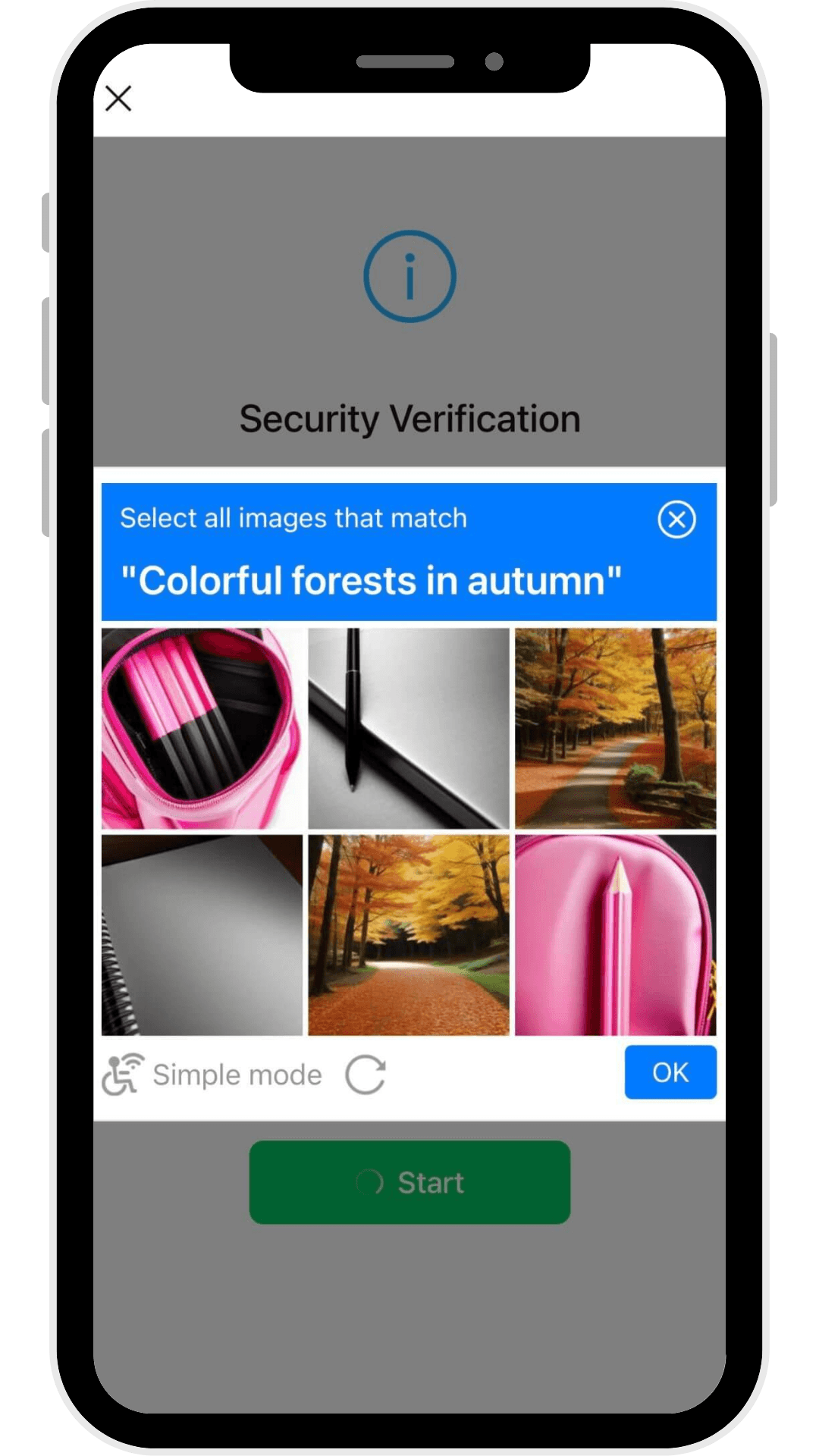
To prevent spam and automated registrations, WeChat performs a human verification step during account creation.
Most users will be presented with a slider puzzle, where you drag a puzzle piece into the correct position. This verification usually only takes a few seconds but must be completed within the allotted time.
If the verification fails, simply try again. Ensure your internet connection is stable and avoid switching apps during this stage, as interrupting the process may require you to restart the registration.
Phone number and email verification
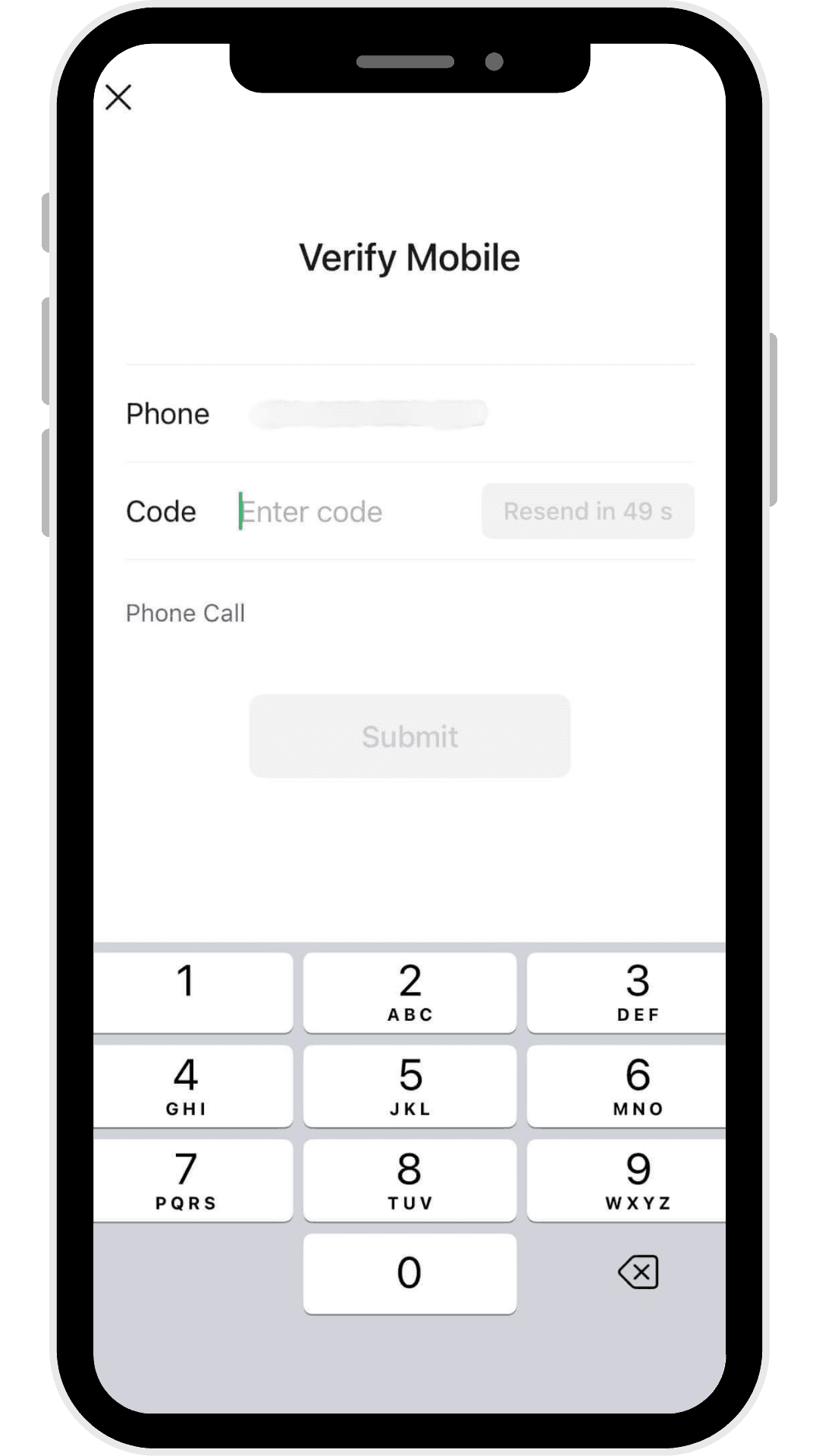
Once you've completed the security check, WeChat will send a verification code via SMS to the mobile number you provided.
Enter the code exactly as received before it expires. If you don't receive it within a few minutes, confirm that your phone number and country code are correct before requesting another code.
In some cases, WeChat may also request an email address for additional verification or account recovery. If prompted, enter your email, open the verification message, click the confirmation link, and return to the app to continue the registration process.
Both verification methods help protect your account and ensure that only legitimate users can complete registration.
Friend verification: Scanning the QR code
One of the most common challenges for new users—particularly those registering outside Mainland China—is friend verification.
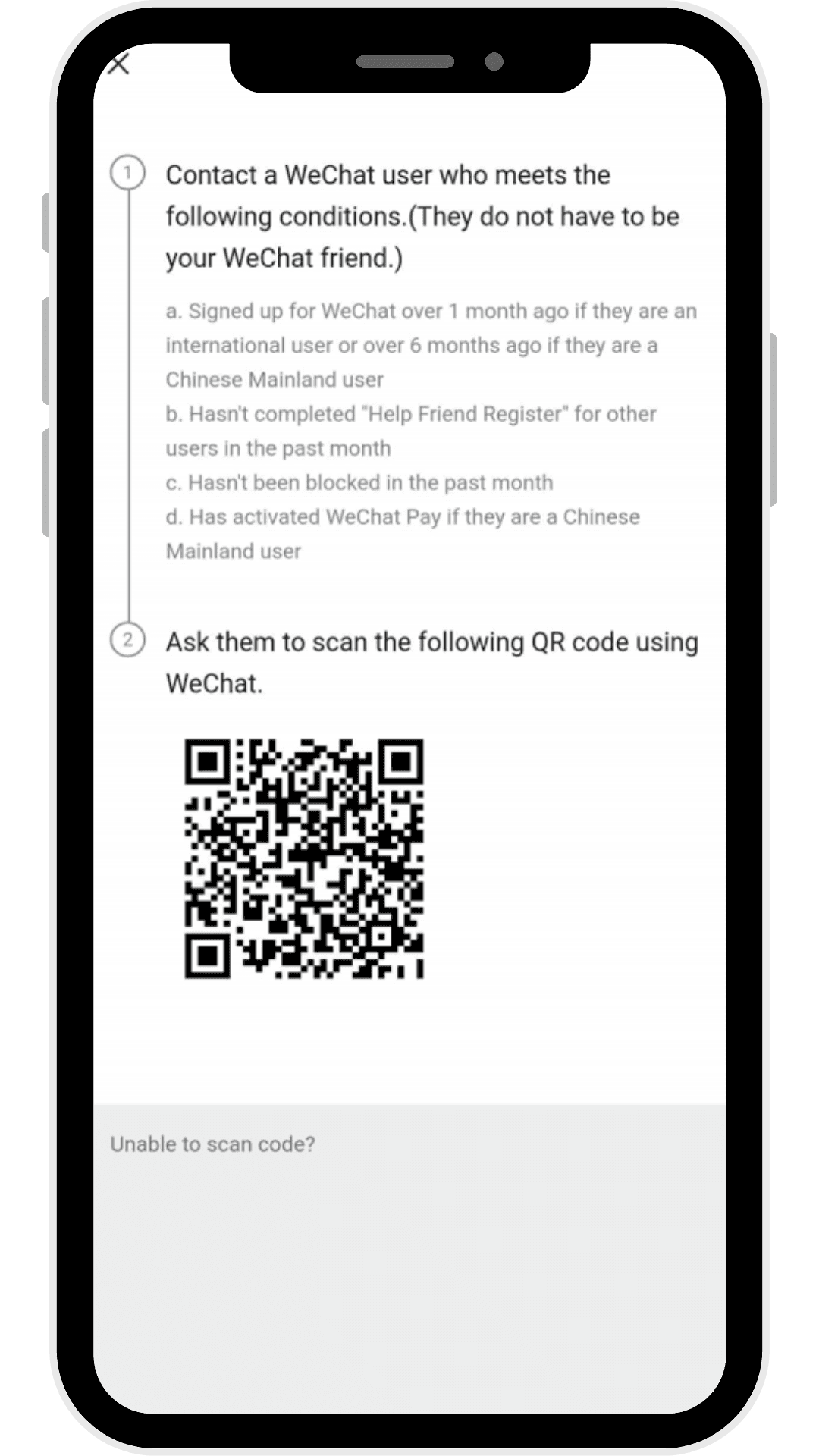
After completing SMS verification, WeChat may display a QR code that must be scanned by an existing WeChat user. This additional security measure helps reduce fake accounts and maintain the integrity of the platform.
The person helping you verify your account must satisfy WeChat's eligibility requirements. Although Tencent doesn't publish every condition, the helper generally needs to:
Have an active WeChat account in good standing.
Have used WeChat for a minimum period.
Not have exceeded the recent limit for verifying new users.
Meet additional eligibility requirements depending on their region. For users in Mainland China, this may include having an active WeChat Pay account.
Not have been recently restricted or suspended by WeChat.
The QR code remains valid for a limited time, so it's best to coordinate with your helper before reaching this step. Avoid closing the registration screen or switching devices while waiting for verification, as doing so may invalidate the code and require you to restart the process.
If you don't know anyone who uses WeChat, you may need to ask a colleague, friend, business contact, or family member who already has an eligible account. Some online communities also share guidance on the verification process, although you should always avoid unofficial paid verification services, as these may violate WeChat's Terms of Service.
How to make a WeChat ID and complete your account setup
Once your account has been activated, it's time to personalize your profile.
One of the first things you'll do is create a WeChat ID, which serves as your unique username. Unlike your display name, your WeChat ID allows other users to find and add you more easily.
Choose your WeChat ID carefully. It should be easy to remember, professional if you're using WeChat for work, and consistent with your identity on other social platforms whenever possible. Keep in mind that WeChat only allows you to change your WeChat ID under limited circumstances, so selecting the right one from the beginning is recommended.
Next, upload a profile photo and complete your personal information. A recognizable profile picture helps contacts identify you, while adding a short bio or display name can make your account feel more complete.
Before you begin using WeChat regularly, review your privacy and security settings. You can control who can find you using your phone number or WeChat ID, who can send you friend requests, and who can view your Moments posts. Taking a few minutes to adjust these settings helps create a safer and more personalized experience.
Enabling WeChat services and exploring key features
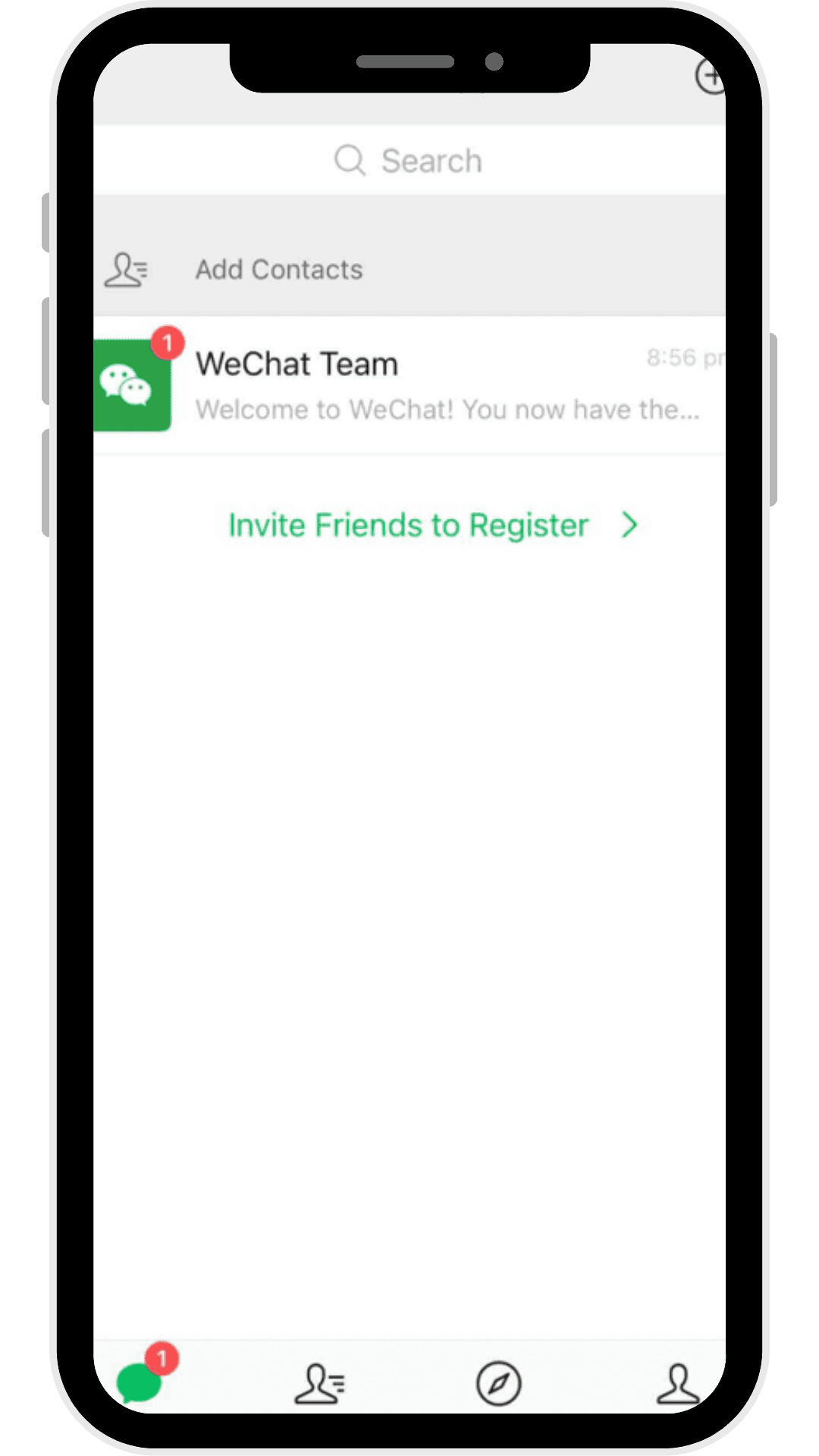
After completing your account setup, you can begin exploring WeChat's ecosystem.
At its core, WeChat is a messaging platform that supports text messages, voice messages, voice and video calls, group chats, file sharing, and Moments, where users share updates, photos, and videos with their contacts.
Beyond communication, WeChat offers a growing range of services. WeChat Channels lets users discover and publish short-form videos, while Top Stories recommends articles and trending content based on your interests. Mini Programs allow you to access lightweight apps without downloading separate software, making it easy to shop, book appointments, order food, or access business services directly within WeChat.
Some services, such as WeChat Pay, business accounts, and certain Mini Programs, may require additional identity verification or may only be available in specific regions.
Finally, take a moment to customize your notification preferences and privacy settings. Managing these options early will help you enjoy a smoother, more secure WeChat experience as you begin using the platform regularly.
Common problems when registering a WeChat account and troubleshooting tips
Although creating a WeChat account is usually straightforward, some users—especially those registering outside China—may encounter verification or login issues. Fortunately, most problems can be resolved by checking your account information and following WeChat's security requirements.
I didn't receive the SMS verification code
If the verification code doesn't arrive, first confirm that you've entered the correct country code and mobile number. Wait a few minutes before requesting another code, as SMS delivery can sometimes be delayed depending on your mobile carrier.
If the problem persists, try switching between Wi-Fi and mobile data, restarting your phone, or temporarily disabling spam filters that may block verification messages.
Friend verification isn't working
Friend verification is one of the most common obstacles for new users. If WeChat rejects the verification, it's often because the person scanning your QR code doesn't meet the platform's eligibility requirements.
Ask another eligible WeChat user to help if possible. The assisting account should be active, in good standing, and meet WeChat's verification requirements. If your QR code expires, simply restart the verification process to generate a new one.
My account was restricted immediately after registration
New accounts may occasionally trigger WeChat's automated security system, particularly if multiple registration attempts were made within a short period or unusual network activity was detected.
If your account is temporarily restricted, follow the instructions provided in the app to complete identity verification. Avoid creating multiple accounts simultaneously or repeatedly attempting to register with the same device.
I can't log into my new account
If you're unable to log in after registration, verify that you're using the same login method you originally selected. If you registered with a phone number, continue using that number rather than another sign-in option.
If you've forgotten your password, use the Forgot Password option to recover your account through your registered mobile number or other available recovery methods.
My WeChat account was suspended
If WeChat suspends your account, you'll usually receive a notification explaining the reason. Minor restrictions can often be resolved through self-service verification, while more complex cases may require contacting WeChat Support.
Always follow WeChat's Community Guidelines and Terms of Service to reduce the risk of future account restrictions.
Best practices for securing and managing your new WeChat account
Once your account is active, taking a few minutes to improve its security can help protect your personal information and prevent unauthorized access.
Start by choosing a strong password if your account uses password-based login. Avoid using the same password across multiple platforms, and update it periodically.
Review your Account Security settings regularly. WeChat allows you to manage trusted devices, monitor recent login activity, and update your recovery information if needed.
It's also recommended to enable additional verification methods whenever available. Linking an email address can simplify account recovery if you lose access to your phone number.
When using WeChat on a shared or public computer, always log out after each session. Avoid scanning QR codes from unknown sources or clicking suspicious links sent through private messages or group chats.
Finally, review your privacy settings to control who can search for your account, send friend requests, or view your Moments. These settings can be adjusted as your personal or professional needs change.
FAQ: How to create a WeChat account
Can I create a WeChat account without a phone number?
In most cases, no. A valid mobile phone number is required to register a new WeChat account and receive the SMS verification code. Some login options, such as Apple Sign In, may simplify authentication on supported devices, but a phone number is still typically required during the registration process.
Why does WeChat require friend verification?
Friend verification is an additional security measure designed to prevent spam, fake accounts, and automated registrations. It helps WeChat maintain a trusted user community by confirming that new accounts are created by real people.
Can I use the same phone number for multiple WeChat accounts?
No. A mobile phone number can only be linked to one personal WeChat account at a time. If your number has already been used, you'll need to recover the existing account or use a different eligible phone number.
How do I make a WeChat ID?
After successfully creating your account, go to Me > Profile > WeChat ID and choose a unique username. Your WeChat ID is different from your display name and is used by others to search for and add your account.
Can I change my WeChat ID later?
Yes, but WeChat limits how often you can change your WeChat ID. Because updates aren't always immediately available, it's a good idea to choose a username you'll be happy using long-term.
Is WeChat free to use?
Yes. Creating a WeChat account and using its core features—including messaging, voice calls, video calls, Moments, and Channels—is free. Some services, such as WeChat Pay or third-party Mini Programs, may involve additional charges depending on the provider.
Why can't I receive the verification code?
This is usually caused by an incorrect phone number, carrier delays, network issues, or temporary server congestion. Verify your information, wait a few minutes, and request another code if necessary.
Can businesses create a WeChat account?
Yes. Businesses can create Official Accounts to publish content, engage with followers, provide customer service, and support marketing campaigns. Business accounts have a separate registration process from personal accounts and may require company verification.
Summary
Title



Go further
Explore our services and platforms


Newsletter